Building a Metronome That Keeps Perfect Time: What Rewriting Ours in Swift Taught Us
Why timers can't keep musical time, how sample-accurate scheduling with AVAudioEngine fixes it, and the real-world lessons from rewriting our Metronome app in Swift, from audio interruptions to tap tempo and Apple Watch haptics.
A metronome may be the least forgiving app you can build. It has one job, and its users are people who train for years to hear when time is slightly off. A calculator can be a bit slow. A game can drop a frame. A metronome that drifts, even by a few milliseconds a beat, is broken, and musicians will notice before you do.
Our Metronome app has been downloaded more than 12 million times. Its previous version was written in C# with Xamarin. In 2026 we rewrote it from the ground up in Swift and SwiftUI. The rewrite gave us a chance to rebuild the timing engine from first principles, and the lessons apply well beyond music: to games, fitness apps, video sync, and anything else where "roughly now" isn't good enough.
Why a Timer Can't Keep Time
The obvious way to build a metronome is a repeating timer: every half-second at 120 BPM, play a click. It is also the wrong way, for two reasons.
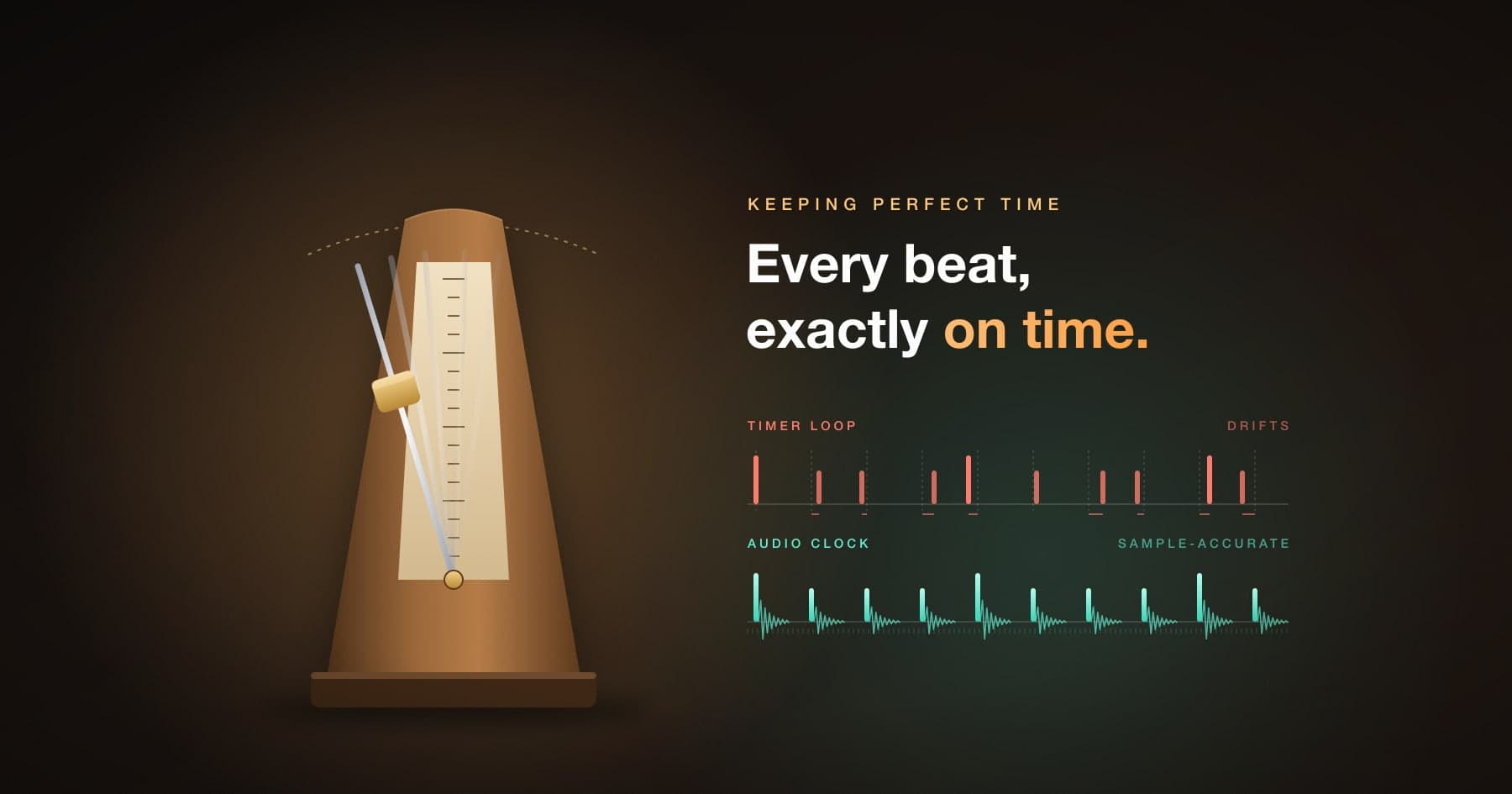
Timers are late, and late in different amounts. A timer callback runs on a thread that is also doing other work, such as drawing the interface, handling touches, or running animations. When the thread is busy, the callback waits. The click lands a few milliseconds late one beat, on time the next, and late again after that. Musicians hear that unevenness as a sloppy, nervous pulse. Engineers call it jitter.
Errors accumulate. If each tick is scheduled relative to the previous one, every late tick pushes all the following ones later too. Over a few minutes of practice, the tempo quietly slows. That is drift.
Then there is the audio system itself. Sound doesn't leave the speaker the instant you ask for it. It passes through buffers on its way to the hardware, which adds latency of its own.
The fix is to stop asking "is it time yet?" and instead tell the audio hardware exactly when each click should play.
Schedule on the Audio Clock
The audio hardware runs on its own extremely steady clock, counting samples. At a sample rate of 44,100 per second, each sample lasts about 23 microseconds. If you place each click on a specific sample number, the hardware plays it at exactly that moment, no matter what the rest of the app is doing.
On iOS, AVAudioEngine with an AVAudioPlayerNode makes this possible. The heart of our engine is one small calculation:
// How many audio frames one beat lasts at a given tempo.
static func samplesPerBeat(bpm: Int, sampleRate: Double) -> Int {
    Int((sampleRate * 60.0) / Double(max(1, bpm)))
}
At 120 BPM and 44.1 kHz, a beat is 22,050 samples. At 60 BPM and 48 kHz, it is exactly 48,000. Our unit tests pin down these values, because the whole app rests on them.
Each click is then scheduled at an absolute position on the player's timeline, at sample 0, then N, then 2N, and so on:
let when = AVAudioTime(sampleTime: nextSampleTime, atRate: sampleRate)
player.scheduleBuffer(click, at: when, options: [],
                      completionCallbackType: .dataConsumed) { _ in
    // Queue the next beat.
}
nextSampleTime += samplesPerBeat
Because every beat is calculated from the start of the timeline rather than from the previous beat, errors can't accumulate. Beat 1,000 is exactly 999 beats after beat 1.
A detail no one can hear
There is one subtle consequence of counting in whole samples. At 113 BPM and 44.1 kHz, a beat should last 23,415.93 samples, but the engine can only schedule whole ones, so it uses 23,415. The true tempo is therefore 113.004 BPM. Over a three-minute song, that adds up to about 7 milliseconds.
No musician can hear that, because the metronome is its own reference and the spacing between clicks stays perfectly even. It would only matter if the app had to stay locked to another device's clock for a long time. We mention it because it shows what "perfect" means in practice: every beat evenly spaced, with any remaining error far below what a human can perceive.
The Bug That Only Appeared on Real iPhones
Our first version of the start-up logic worked perfectly in the simulator and dropped beats on real devices.
The approach seemed sensible: start the player immediately, then schedule the clicks at explicit times. On hardware, those times were sometimes already in the past by the time the audio system began rendering, so the first beats were silently discarded.
The fix was to reverse the order. The engine now schedules the opening beats first, then starts the player at a precise moment about 200 milliseconds in the future. That short lead-in gives the audio hardware time to spin up, and because the player's sample clock begins at zero at that exact moment, every scheduled beat lands where it should. A comment in our engine calls it "the only approach I've found that works reliably on device," which is a fair summary of a long afternoon.
The broader lesson: the simulator isn't an audio device. Anything timing-sensitive has to be tested on real hardware, ideally several models.
Keep the Queue Short
Many audio engines schedule seconds of sound in advance. We deliberately keep just one beat queued. When a click is handed to the mixer, its completion handler schedules the next one.
The reason is responsiveness. Musicians change sounds, accents, and tempos while the metronome is playing. With a long queue, a change would wait until the backlog played out. With a one-beat queue, it lands on the very next beat.
The trade-off is that the main thread must respond at least once per beat. At 240 BPM, the fastest tempo we support, that is once every 250 milliseconds, which is a long time for a well-behaved app. It is a deliberate choice that favors a responsive feel over theoretical safety margins.
Silence Is Also a Beat
One of our practice features, bar muting, plays a few bars and then drops a bar or two of silence, so players can check whether they held the tempo on their own. The naive implementation, pausing the player during silent bars, would break the timeline and bring the jitter back.
Instead, the engine schedules a tiny silent buffer, just four samples long, in place of each muted click. Nothing else changes. As a comment in our code puts it, a silent bar "occupies exactly the same grid as an audible one," and that is the entire point of the exercise. When the clicks return, they are exactly where they would have been.
Surviving the Real World
A metronome doesn't run in a lab. It runs on a phone that receives calls, plays alarms, talks to Siri, and connects to Bluetooth speakers. Another comment from our code sums up the stakes: without careful handling, "the metronome silently dies after a phone call or headphone unplug."
What that handling involves:
- Audio interruptions. When a call or alarm interrupts audio, the app records whether it was playing. When the interruption ends and iOS indicates playback may resume, it restarts automatically.
- Mixing with other audio. Musicians often practice along with a recording, so the audio session is configured to play alongside other apps rather than silencing them.
- Background playback. The metronome keeps going when the screen locks, which matters when the phone is sitting on a music stand.
- Sharing the audio system with the tuner. The app's tuner listens through the microphone, which reconfigures the shared audio session. The metronome re-establishes its own settings every time it starts, because a leftover configuration from the tuner could otherwise mute it without any error.
None of this is glamorous. All of it is the difference between an app that works in a demo and one that works in a rehearsal room.
Tap Tempo: Precision for Machines, Forgiveness for People
Tap tempo, where you tap along to set the BPM, needs almost the opposite philosophy from the engine. The engine must be exact. Human taps are not, and the software has to forgive them.
Our approach:
- Wait for three taps. Two taps produce one interval, and a single interval carries all of the tapper's timing error. Tapping 15 percent early once would read as a tempo 15 percent wrong. Three taps average two intervals, which is where readings settle down.
- Average a short window. The app averages the last five intervals. A longer history makes the reading sluggish exactly when someone is correcting themselves mid-tap.
- Discard outliers. A missed tap doubles one interval and an accidental double-tap halves one. Intervals far from the median are ignored, so one slip doesn't drag the tempo somewhere the user never tapped.
- Reset after a pause. A gap of more than two seconds starts a new measurement rather than averaging old taps with new ones.
This logic is kept separate from the user interface, so it can be tested on its own, and it is covered by its own suite of unit tests.
On the Wrist: When You Can't Use the Audio Clock
Our Apple Watch companion plays clicks and taps a haptic pulse on the wrist for every beat. The audio side uses the same scheduling approach as the phone, anchored to the system's host clock.
Haptics are harder, because there is no way to schedule a haptic on the audio timeline. The watch engine instead runs a loop that sleeps until each beat's deadline and then fires the tap. The important detail is the same as on the phone: every deadline is computed from the moment the metronome started, never from the previous beat, with a tolerance of just 4 milliseconds. A late wake-up affects one beat and nothing after it.
Why We Chose Native Swift
We are strong advocates of cross-platform development. Our Calc Pro calculator runs on phones, tablets, and the web from a single React Native codebase, as we describe in One Codebase, Every Screen.
For Metronome, native Swift was the right call. The product's core value is audio timing and deep integration with iOS: audio sessions, background playback, interruption handling, and watchOS haptics. A cross-platform framework could have drawn the interface, but the critical code would have been native anyway, and we would have added a layer between ourselves and the parts that matter most. We explain how we make that call for clients in our app cost guide.
Lessons for Any Timing-Sensitive App
- Use the hardware's clock. The audio clock, the display's refresh signal, or the system's monotonic clock, never a general-purpose timer, for anything a user can perceive.
- Schedule ahead, in absolute time. Tell the system when something should happen instead of reacting when you think it is time.
- Compute from the start, not from the last event. That single rule eliminates drift.
- Test on real devices. Simulators don't reproduce real audio hardware, thermal throttling, or background interruptions.
- Handle the messy world. Calls, alarms, Bluetooth, and other apps sharing the audio system are normal conditions, not edge cases.
- Be exact with machines and forgiving with people. Precision in the engine, smoothing on human input.
The same principles apply on the web, where the Web Audio API offers its own high-precision clock. Chris Wilson's classic article A Tale of Two Clocks remains the best introduction to scheduling sound in the browser.
Building an app where timing, audio, or performance is the product? At Panoramic Software, we have been shipping precision apps for musicians, students, and professionals for more than a decade. Tell us what you are building.
Further Reading
- Apple Developer Documentation: AVAudioPlayerNode
- web.dev: A Tale of Two Clocks: Scheduling Web Audio with Precision

Metronome
4.6Put Metronome to work
Get Metronome on your iPhone and iPad.
Take it with you